Dell 1720 Laptop replacement battery and power adapter

time for replacements

The 9-cell battery that came with my Dell 1720 notebook in late 2007 now only gives about 15 minutes of power from full charge (used to be 3 hours or so) even on the most power-saving settings.

The power adapter or charger (the cable and “brick” that plug into the electrical socket) was failing too. It powered the laptop but wouldn’t charge the battery.

Lucky for me, my wife’s Dell 1520 adapter is compatible, so I was able to continue to use my laptop easily while I shopped for a replacement. I was also able confirm that it was both my battery and my adapter that were failing: neither adapter could make my battery hold it’s charge, and my adapter wouldn’t charge either battery.

razor blades and print cartridges

My first plan was to get genuine Dell replacements; I didn’t want to risk frying my laptop. But I was surprised to discover them not listed on Dell’s website. While searching around, I discovered Dell’s own customer reviews of the compatible 6-cell and 9-cell batteries for my 1720 were not encouraging. Dozens of customers complained that the batteries failed within a year or two of use and the replacement prices were baffling – USD$155 for a battery!

I googled around a bit more and discovered that this is a common complaint. It didn’t take long for me to realise I’m looking at one of the oldest tricks in the book: Selling something cheap and making money off the consumables. Just as Gilette gave away free razors but make a profit on the blades, and Canon sell $30 printers that only take $50 cartridges, Dell had sold me a nice laptop at a good price but were making a killing on cheap-to-make batteries. Someone even said Dell puts a chip in the power adapter so the laptop can check for non-dell-brand adapters and refuse to charge from them.

but can you risk your laptop?

I called Dell anyway. They said they were too busy to tell me the price (?) and would email me back. I began to look at 3rd party products – there are plenty of online sellers with compatible batteries and adapters. I found some on eBay from China that were claimed to be “genuine Dell parts” for less than $50, but this isn’t my first time buying “genuine” stuff on eBay. Even if it’s a good factory second or something from Dell’s own factory, can I really trust it not to fry my laptop?

an easy decision

A few days later, Dell finally replied with a quote for my battery and adapter:

Part Number: UW280 – 9 cell
Price including GST: $242
Availability: 10 – 15 working days
Part Number: DF266 + FF683 – adapter
Price including GST: $110
Availability: 10 – 15 working days

So that’s AUD$352 (USD$322), and 2-3 weeks, for parts that should still be working (and I now know they will fail again in less than 3 years). I could literally buy a new laptop for that price (with Windows, a 1.6Ghz CPU and 1Gb of RAM). Even Dell has a windows 7 machine for less than that on their US site (with a 6-cell battery and power adapter included – so it’s not like they’re actually expensive to make).

I ordered the ones from eBay.

taking the plunge

An eBay seller named Lycfeng sold me a brand new 9 cell, 85Wh “genuine Dell” FK890 battery for AUD$57.98 (including postage from China to Australia). It arrived only 7 days later in a plain cardboard box:
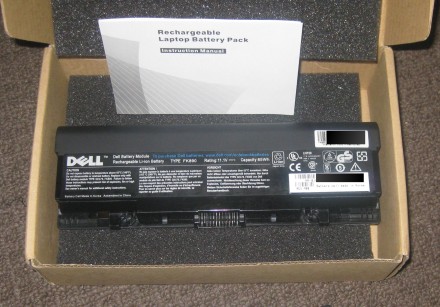
The new battery itself is identical in size and shape. It looks like a slightly newer version of my old battery – just claiming to be made in China using Korean-made cells (the original was made in Japan).

I backed up my data, said a prayer, swapped it in, and switched the laptop back on. I got pretty concerned when I got a BSoD and an IRQL_not_less_than_or_equal error on startup (!) but I remembered I’d got this once or twice in the past and tried simply restarting. This time the laptop started up fine and has worked well ever since. The battery lasts about 3.5 hours on conservative settings (that’s at least as good as the original battery – it’s a 17″ laptop with 2 HDDs) and never gets hot (always cooler than the rest of the machine, actually).

The adapter was a “genuine” Dell PA10 (90W 5.62A 19.5V) from a seller named unstar2006. It shipped in 8 days from China for $26.57 (including postage). It looks exactly like the old one, and has worked without any problems.

Update: after about a month, I have had a problem with it, though it was easily fixed. These adapters come in 2 parts:

  1. a long cord with the dell-specific plug for the laptop on one end, and the “brick” that does the actual power conversion on the other.
  2. a shorter, standard cord with a three prong IEC-C5 connector (that plugs into the “brick”) on one end, and a standard AC plug, that goes into your wall outlet, on the other. These are generic standard plugs that cost about $5-10 from eBay or an electronics shop. Many laptop power bricks use the same connector.

The eBay auction was aimed at an international audience, so the seller said he would ship the main part of the adapter (cable 1) with whatever version of cable 2 fits the buyer’s electrical wall outlets (because it depends on what country they live in). For me, he included one that fits Australian electrical outlets.

It appears it wasn’t a good quality one though, as it simply stopped working about a month later. This might concern some people about the quality of parts unstar2006 is using (though he didn’t claim that cable 2 was a genuine Dell). Personally, it hasn’t bothered me because I have one from my old dell power adapter still lying around. I plugged that in and everything works perfectly again. Since then, I bought another for my wife’s laptop, and her cable 2 died within a few months too. So if you’re thinking of buying one of these, keep this in mind (and don’t throw away your old cables).

the verdict

I’ve only had these for a month at time of writing, so the jury is still out on how long they’ll last. I’ll add an update to this post if they fail anytime soon (I have already had a problem with the wall plug part of the power adapter, as noted above, but it was very easily fixed).

But while I still think they’re most likely just excellent counterfeits, or made at Dell’s factory without their permission, I’ve had no real problems (not even any evidence that they’re not genuine Dell parts).

Not bad for $85 (almost $250 less than Dell’s price).

Your mileage may vary, and all the usual disclaimers, but so far my own experience has been great.

Fix the WordPress post editor with Greasemonkey

way too small

The WordPress post editor is way too small. Look:

That’s like, 10 lines of text. Anything but a very short post, and you have to scroll.

Scrolling won’t kill you of course, but unless you’re browsing on your phone, you probably have lots of vertical space to spare, so why not use it?

One way to increase it is the setting in your WordPress dashboard :

Settings > Writing > Size of the post box

You can also just drag the bottom right corner of the post editor!

So it turns out WordPress has this covered. (So if you came here looking for how to change that height, you’re done – if you want to learn how to make any change to a website, setting or none, read on!)

But what if there was no such setting? Is there a way to change things like this on websites you visit?

enter the monkey

Greasemonkey is made for stuff like this: customising web pages to suit your needs. It’s a firefox extension that allows you to store little snippets of javascript that run on certain pages (or whole sites).

You could change the fonts and backgrounds, or make your wordpress post editor bigger or pretty much any change you can imagine. Some people have even made scripts to play tedious facebook games for them (pro tip: if you’d rather have the computer play it for you, it’s not a “game”).

There’s a whole bunch of neat scripts other people have made on userscripts.org.

Go get it now and I’ll show you how I fixed the post editor.

fixing the post editor

After you’ve installed Greasemonkey and restarted Firefox, you should see a little monkey on the bottom right of the browser:

Right-click on it and choose New user script. Give it a meaningful name, and under includes, put

http://whateveryoublognameis.wordpress.com/wp-admin/post.php*

(the asterisk makes this script work with any URL starting with http://whateveryoublognameis.wordpress.com/wp-admin/post.php)

You’ll have to choose a text editor the first time you run it (I recommend notepad2, you’ll get nice syntax highlighting, but any plain text editor, like windows Notepad, will do)

Your text editor will appear with a nice header. Put the following line under it:

document.getElementById('content').rows = 30;

Like this:

Change the 30 if you want the post editor to be even larger (WordPress’s default is 20).

Hit save, and your done. Next time you edit a post in wordpress, it should look more like this:

Ahhhhhhhhh. Much more room.

Enjoy!

Overkill: The problem of over-modding on StackOverflow

A place for programming questions

StackOverflow was originally designed to be about simple programming questions, as defined in the FAQ. Specific questions that have a correct answer and often contain code. Like experts-exchange, but done right. Got a compiler error you don’t understand? Trying to do something in code but not sure how? That sort of thing. Questions like:

Can I add a public function to objects in JavaScript? How?

How can we set the background color in a datatable through codebehind?

The other official sites seem to keep this kind of question as their main focus. I agree with this direction, and I’ve asked and answered plenty of questions like this (that first question is mine). Stackoverflow includes tools allowing the community to close questions that don’t fit these guidelines, like obvious spam, exact duplicates of existing questions, anything that’s not a question, etc.

Other Questions

However, from very early on there was an unintended side-effect: some questions emerged that didn’t exactly fit that mould (for example, somewhat subjective, or discussion style questions) but were still interesting, and got interesting answers. They weren’t completely outside the official guidelines, but they weren’t completely inside them, either. The quality and size of the programmer community combined with the ability to vote and edit created something unique which many users considered to be worthwhile. Many of these questions became very popular.

A few examples:

In fact, looking at the top 15 questions on StackOverflow while I write this, at least 12 are subjective (e.g.: Strangest-language-feature), not strictly programming problem questions (e.g.: what is your best programmer joke) or not questions at all (e.g.: I’m graduating with a Computer Science degree but I don’t feel like I know how to program.).

Overkill

Only moderators and users with fairly high reputations can vote to close questions. I’ve noticed that some of them, apparently thinking they’re “doing the right thing”, are taking the official question guidelines to the extreme – so much so that they’re actually doing more harm than good.

Once again, I’m not talking about legitimately bad questions here – spam, real duplicates, totally off-topic stuff. They need to go (of course). But I’ve noticed that any question that could be even a little bit subjective, anything that has no source code in it, anything sounding similar to an existing question (even if they are actually totally different) will get close votes and terse comments.

Some questions have survived in spite of this, but it’s frustrating to see interesting questions shot down so often. Even 2 of the top 15 questions above have been closed.

It’d be hard to argue that there was nothing interesting, important or valuable in Alan Kay’s question above (and it’s answers). And yet, the very first comment calls it “not programming related”. Another curtly states it should be closed as a discussion question.

This problem has spread to many of the other sites on StackExchange, too. At one point, if you asked a question on StackOverflow and a couple of people thought it would be better on SuperUser, it would be migrated there even though SuperUser was still in private beta. Your question would disappear and, as far as you knew, there was no way for you to see your own question, let alone any answers.

I know I’m not alone on this. There are highly upvoted comments on Kay’s question like “If this gets closed, I may never come back to this site again” and “Yeah, can we please not show Alan Kay what a bunch of children we are by having a close/open war right in front of him?” and “144 votes, 8k views, 93 favorites, a positive mention in the SO podcast, a topic of Jeff’s Coding Horror blog, and a driver for a change in functionality of the site. Yeah, this question shouldn’t be here! :rolleyes:”

Don’t get me wrong, I understand that spam, real duplicates, truly off-topic questions, and pointless opinion wars hurt the site (and if they got out of control, that would be much worse than this).

But these sites exist for the benefit of their communities. Please, think twice before voting to close.

And if you’re unsure – why not just leave it alone?

Online .epub converter

I often find myself wanting to save a book, story or article to my phone so I can read it later (on the train to work, for example).

Unfortunately most phones don’t handle large plain-text or html files very well. My Android is OK, but not ideal – it won’t remember where I’m up to, for instance. So I try to get content in the .ePub format and import it into Aldiko, my current favourite Android eBook reader.

I found a good, free, online .ePub converter today:

http://www.2epub.com/

It allowed me to quickly turn a book I had in plain text format into an ePub file. It supports a bunch of different formats and was easy to use. No fuss. Recommended.

ASP.NET AJAX Scriptmanager error

I recently had a problem using ASP.NET AJAX where I got an error message something like this:

The base class includes the field ‘ScriptManager1’, but its type (System.Web.UI.ScriptManager) is not compatible with the type of control (System.Web.UI.ScriptManager).

I had no idea how a particular type could be incompatible with itself, so I checked Stack Overflow (easily the best question and answer site for programmers). I found a question about this problem, but none of the existing answers worked for me. I googled around a bit, and eventually solved the problem. So here’s the answer for anyone else who might have this problem:

I managed to fix it by adding this to web.config:

<runtime>
    <assemblyBinding xmlns="urn:schemas-microsoft-com:asm.v1">
        <dependentAssembly>
            <assemblyIdentity name="System.Web.Extensions" publicKeyToken="31bf3856ad364e35"/>
                <bindingRedirect oldVersion="1.0.0.0-1.1.0.0" newVersion="3.5.0.0"/>
        </dependentAssembly>
        <dependentAssembly>
            <assemblyIdentity name="System.Web.Extensions.Design" publicKeyToken="31bf3856ad364e35"/>
            <bindingRedirect oldVersion="1.0.0.0-1.1.0.0" newVersion="3.5.0.0"/>
        </dependentAssembly>
    </assemblyBinding>
</runtime>

I believe it forces the .net runtime to use the new versions of those assemblies.

I added this to the Stack Overflow question too, for posterity. That’s one of the cool things about Stack Exchange sites, the platform encourages questions to be solved properly, once and for all, and then easily found by anyone coming later.

Obviously it helped a lot of people – my answer fast became the top answer (by far) and I earned the rare “necromancer” badge for resurrecting an old question with a popular answer.

So there you go: if you found this through searching for answers to the above problem, I hope I’ve helped you solve it. If you’re in need of answers for programming, or a heap of other things, see if there’s a stack exchange site for you. If not, propose one.

Tiger Arcade – free MAME arcade emulator for Android

Update: apparently, this app is now listed on the Market under TigerArcade(MAME) – some of the info may be out of date. If anyone finds the official site for this app, let me know.

Yesterday I found Tiger Arcade in the Android Market. It’s an arcade machine emulator, based on MAME, for Android, and it’s free.

I installed it, grabbed the arcade ROMs for Final Fight and Street Fighter II and was surprised to see how well it’s working so far. It ran a bit slow on my HTC Magic, and the graphics were a bit glitchy, but it was just about playable (though of course it’s a bit easier for those of us with a gamepad or physical keyboard).

A few more features could make a big difference to the fun factor:

  • smoother play (speed optimisations or maybe just a frameskip option)
  • fewer graphical glitches
  • save states
  • more customisable on-screen controls (the latest version of Snesoid is a good example of the kind of options that are useful)

But there’s plenty of hope that these features may get added soon: today an update was released which includes a feature that was missing until now: support for more than 4 buttons! (The Streetfighter games are a lot more fun with this).

If this sounds like your thing, search for tiger arcade in the Android Market.

Shoryuken! (search for that in the market too)

* * *